A developer reference covering the image preprocessing pipeline, Tesseract configuration, fuzzy skill matching, and tuning parameters.
1. Architecture Overview
The OCR pipeline consists of three modular layers, lazy-loaded on first use to avoid slowing down initial page load:
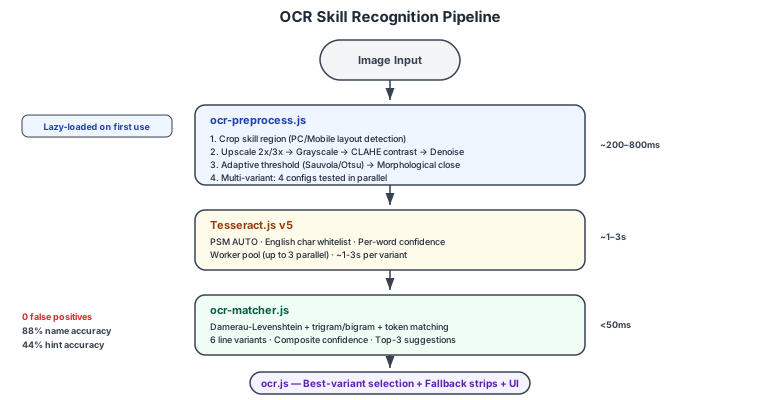
Image Input
    |
    v
[ocr-preprocess.js]  Image Preprocessing
    |  - Upscale (2x/3x)
    |  - Grayscale + CLAHE contrast
    |  - Denoise (median filter)
    |  - Adaptive threshold (Sauvola) or Otsu
    |  - Morphological close
    |  - Multi-variant output (4 configs tested in parallel)
    v
[Tesseract.js v5]    OCR Engine (English)
    |  - PSM AUTO, char whitelist
    |  - Per-word confidence scores
    |  - Worker pool (up to 3 parallel workers)
    v
[ocr-matcher.js]     Fuzzy Matching + Confidence Scoring
    |  - Damerau-Levenshtein edit distance
    |  - Trigram + bigram similarity
    |  - Token-level word matching
    |  - Composite confidence scoring
    |  - Top-3 suggestions for low confidence
    v
[ocr.js]             Integration + UI
    |  - Best-variant selection
    |  - Fallback strip OCR (3 horizontal strips)
    |  - Suggestions UI ("Did you mean?")
    |  - Manual correction modal
    |  - Session correction cache
Lazy Loading
OCR scripts are not included in the initial page bundle. They are loaded dynamically when the user first triggers OCR in the optimizer. This saves ~1MB from the initial page load and is handled via dynamic <script> injection in optimizer.js.
2. Source Files
| File | Purpose |
|---|---|
public/js/ocr-preprocess.js | Image preprocessing pipeline |
public/js/ocr-matcher.js | Fuzzy matching, confidence scoring, suggestions |
public/js/ocr.js | Main OCR integration, UI, event handlers |
public/js/ocr-test.js | Test harness and accuracy benchmarks |
public/css/air.css | Shared and OCR-specific interface styles |
public/assets/uma_skills.csv | Skill name dictionary |
3. Preprocessing Pipeline
Skill Region Cropping
The pipeline first detects the layout from aspect ratio and crops to the skill panel:
| Layout | Detection | Crop Region |
|---|---|---|
| PC (landscape) | width/height >= 1.1 | x: 1-40%, y: 27-85% |
| Mobile (portrait) | width/height < 1.1 | x: 0-98%, y: 17-87% |
Processing Steps
Each image runs through up to 9 steps. Multi-variant mode tests 4 configurations in parallel and picks the best:
| Step | Operation | Parameters |
|---|---|---|
| 1 | Upscale | 2x (standard) or 3x (high-res variant) |
| 2 | Grayscale | Standard RGB luminance conversion |
| 3 | CLAHE | Clip limit 2.5, tile size 8x8 |
| 4 | Denoise | 3x3 median filter |
| 5 | Sharpen | Unsharp mask, amount 0.5 (optional) |
| 6 | Adaptive threshold | Sauvola with block radius 7-8, C=10 |
| 7 | Morphological close | Dilate + erode, radius 1 |
| 8 | Deskew | Optional, disabled by default |
| 9 | Best-frame selection | Laplacian sharpness metric |
Multi-Variant Configs
| Variant | Scale | Threshold | Notes |
|---|---|---|---|
| Standard | 2x | Sauvola adaptive | Default, good all-around |
| High-res | 3x | Sauvola + sharpen | Better for mobile screenshots |
| Grayscale-only | 2x | None | Lets Tesseract handle binarization |
| Otsu | 2x | Global Otsu | Better on uniform backgrounds |
Best variant is selected by: skillCount * 0.6 + (ocrConfidence / 100) * 0.4
Configuration
In ocr-preprocess.js, the DEFAULT_CONFIG object:
const DEFAULT_CONFIG = {
  targetScale: 2, // 2x upscale (try 3 for mobile screenshots)
  enableCLAHE: true, // Adaptive contrast enhancement
  claheClipLimit: 2.5, // Higher = more contrast
  claheTileSize: 8, // Tile grid for local contrast
  enableDenoise: true, // Median filter (reduces noise)
  denoiseKernel: 3, // 3x3 kernel
  enableThreshold: true, // Adaptive binarization
  thresholdBlockSize: 15, // Larger = smoother threshold
  thresholdC: 10, // Bias constant
  enableMorphClose: true, // Fill thin glyph gaps
  morphCloseRadius: 1, // 1px structuring element
  enableSharpen: false, // Edge sharpening (helps low-res)
  multiVariant: true, // Run multiple configs in parallel
};
4. Fuzzy Matching
Composite Match Score
The matcher computes a weighted composite of six signals for each candidate skill name:
composite =
  editScore * 0.3 + // Damerau-Levenshtein edit distance
  trigramScore * 0.25 + // Trigram overlap (Jaccard)
  bigramScore * 0.1 + // Bigram overlap (Jaccard)
  tokenScore * 0.2 + // Word-level matching
  prefixScore * 0.05 + // Common prefix bonus
  lenRatio * 0.1; // Length similarity
Adjust weights if certain error types dominate:
- Character substitutions (OCR misreads): increase
editScoreweight - Word-level garbling: increase
tokenScoreweight - Truncated text: increase
prefixScoreweight
Line Variant Generation
For each OCR line, 6 cleaned variants are tested:
- Pipes-as-I (
|toI), strip special chars - Strip pipes entirely
- Strip trailing cost numbers
- Strip hint/discount text then trailing numbers
- Progressive word prefixes (handles trailing garbage)
- CamelCase split for merged words (e.g.,
Flowery7rManeuvertoFlowery r Maneuver)
Confidence Scoring
Final confidence combines four signals:
| Signal | Weight |
|---|---|
| Match score (composite above) | 40% |
| Tesseract engine confidence | 35% |
| OCR text quality (alpha ratio, length, symbol penalties) | 15% |
| Image sharpness (Laplacian variance) | 10% |
Confidence Thresholds
In ocr-matcher.js, the CONFIDENCE_THRESHOLDS object controls UI behavior:
const CONFIDENCE_THRESHOLDS = {
  HIGH: 0.85, // Green badge, no suggestions
  MEDIUM: 0.7, // Yellow badge
  LOW: 0.7, // Red badge, shows "Did you mean?" suggestions
};- HIGH (>= 85%): very likely correct, green badge
- MEDIUM (70-84%): somewhat confident, yellow badge
- LOW (< 70%): uncertain, red badge + top-3 suggestion buttons
Minimum confidence filter: 0.55 (skills below this are discarded entirely).
5. Fallback Strip OCR
When the primary pass detects fewer than 3 skills, a fallback runs targeted OCR on 3 horizontal strips:
| Strip | Region | Catches |
|---|---|---|
| Top | 0-40% | Obtained/rare cards at top of panel |
| Mid | 28-73% | Skipped names in middle |
| Bottom | 58-100% | Cards near buttons at bottom |
High-confidence results from strips are merged into the main list.
6. Hint Level Extraction
The pipeline extracts hint levels from OCR text near skill names (within +/-7 lines):
- Matches:
Hint Lv X,H1nt,Hlnt,LV,Ly(OCR-garbled variants) - Matches discount format:
10% OFF,40% OFM - Fallback: infers hint level from cost using the discount table (10% = Lv1, 20% = Lv2, ... 40% = Lv5)
7. Skill Description Popup
Clicking any recognized skill name opens a skill description popup with:
- Skill name (with JP/EN toggle based on site language)
- Rarity, cost, and rating score
- Full description and activation conditions
- Support cards that offer the skill as a hint (filtered by server EN/JP)
- Characters with the skill as a potential skill (filtered by server)
The popup works across all pages: Optimizer, Calculator, Deck Builder, Hints, Skills Library, and Events. On mobile, it renders as a bottom sheet.
8. Updating the Skill Dictionary
The OCR matcher loads skills from public/assets/uma_skills.csv through the browser URL /assets/uma_skills.csv.
CSV Format
skill_type,name,base_value,S_A,B_C,D_E_F,G,affinity_role
green,Concentration,508,...
golden,Shadow Break,700,...
Adding New Skills
- Add a row to
uma_skills.csvwith the correctnameandskill_type - The matcher dictionary rebuilds automatically on page load
- No code changes needed
Bulk Update
- Run
npm run refresh:data - This refreshes
public/assets/skills_all.jsonfrom GameTora andpublic/assets/uma_skills.csvfrom GameWith - Rebuild: just refresh the page
9. Session Correction Cache
When a user corrects an OCR result (via suggestion click or manual edit), the correction is stored in a session cache (OCRMatcher.addCorrection()).
- If the same garbled text appears again (e.g., in video capture frames), the corrected skill name is used immediately with 99% confidence
- The cache is cleared on page refresh
- No data is persisted to localStorage (privacy-safe)
10. Troubleshooting
Common Failure Modes
| Symptom | Likely Cause | Fix |
|---|---|---|
| No skills detected | Image too dark/bright or too low resolution | Enable Image Enhancement toggle; try 3x scale |
| Wrong skill matched | OCR garbles multiple characters | Click the skill to correct; use suggestions if shown |
| All low confidence | Poor image quality or compression artifacts | Use PNG screenshots, avoid JPEG |
| "Processing image..." hangs | Tesseract worker crashed | Refresh the page; try a smaller image |
| Skills duplicated | OCR reads same line twice | Already deduped; check for variant names |
Debug Mode
Enable via browser console:
window.setOCRDebugMode(true);After running OCR:
window.showOCRDebug();This shows all preprocessing variants tested, OCR confidence per variant, raw OCR text, and detected skills with scores.
Disabling Preprocessing
If preprocessing causes issues:
- Uncheck "Image Enhancement" in the UI
- Or call
window.setOCRPreprocessing(false)in console - OCR will run on the original image only
Running Tests
Load the test harness dynamically:
const s = document.createElement('script');
s.src = '/js/ocr-test.js';
document.head.appendChild(s);
Then run:
OCRTest.runAll();Output includes unit test results (pass/fail counts), accuracy benchmarks (top-1 and top-3 accuracy), and individual test details.
Performance
- Preprocessing: ~50-200ms per variant
- Multi-variant mode: ~200-800ms total (4 configs)
- Tesseract OCR: ~1-3 seconds per variant
- Total pipeline: ~2-5 seconds per screenshot
- No UI stalls (Tesseract runs in a web worker)
- OCR scripts are lazy-loaded (~1MB deferred from initial page load)