This document is a comprehensive reference for how the rating system works in UmaTools. It covers stat scoring, unique skill bonuses, skill evaluation, cost discounting, dependency linking, and the optimization engine. Whether you are a user trying to understand the math behind your rating or a developer maintaining the code, this should have everything you need.
Table of Contents
- Overview
- Stat Scoring
- Unique Skill Bonus
- Skill Scoring
- Skill Costs and Discounts
- Skill Dependencies
- Optimization Engine
- Rating Badges
- Tips
- Source Files
1. Overview
A character's Total Rating is the sum of three independent components:
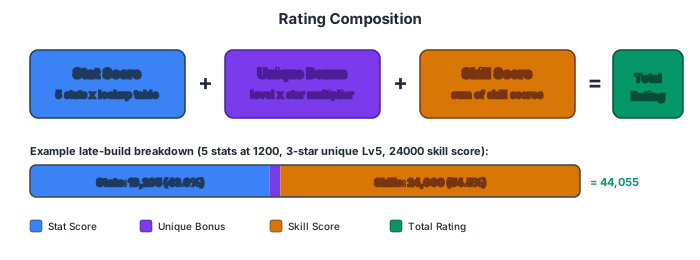
Total Rating = Stat Score + Unique Bonus + Skill Score| Component | What It Measures |
|---|---|
| Stat Score | How high your five stats (Speed, Stamina, Power, Guts, Wisdom) are, scored using progressively increasing lookup-table rates. |
| Unique Bonus | A flat bonus based on the character's star level and unique skill level. |
| Skill Score | The sum of all selected skills' scores, evaluated against your race aptitudes. |
Each component is calculated independently and then summed to produce the final rating, which determines your badge tier (G through LS24).
2. Stat Scoring
Each of the five stats -- Speed, Stamina, Power, Guts, and Wisdom -- is clamped to the range 0 to 2500 and then scored independently. The scores for all five stats are summed to produce the total stat score.
How It Works
The code precomputes a STAT_SCORES lookup entry for every whole-number stat value from 0 to 2500. It accumulates raw per-point rates and stores Math.round(raw / 10) as the displayed score.
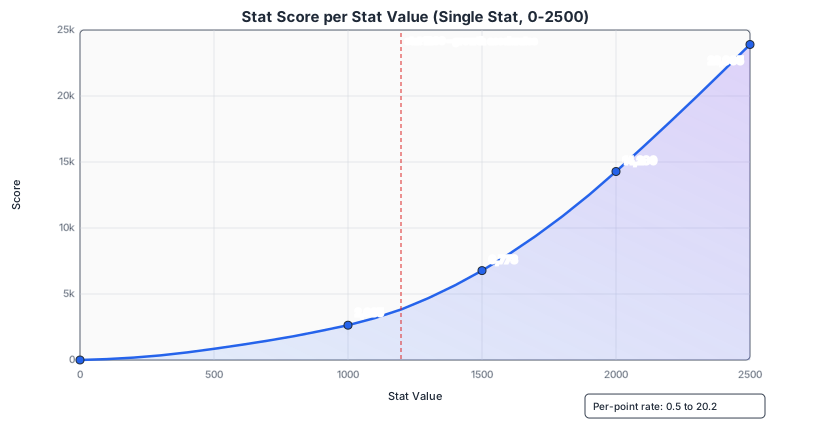
The score grows slowly at low stats and accelerates dramatically at high stats -- the displayed per-point rate ranges from 0.5 in the first block to 20.2 near the 2500 cap.
Scoring Ranges
The lookup table is generated in three ranges:
| Stat Range | Granularity | Raw Rate Behavior | Displayed Per-Point Range |
|---|---|---|---|
| 0-1200 | 50-point blocks | Fixed raw rates from 5 to 68 | 0.5-6.8 |
| 1201-2000 | 10-point blocks | Fixed raw rates from 79 to 182, starting from raw 38,413 at stat 1200 | 7.9-18.2 |
| 2001-2500 | 25-point blocks | Starts at raw rate 183, then increases by 1 every 25 points | 18.3-20.2 |
Boundary Score Table
The cumulative score at selected 50-point boundaries from the integer lookup table:
| Stat | Score | Stat | Score | Stat | Score | ||
|---|---|---|---|---|---|---|---|
| 0 | 0 | 850 | 2,004 | 1700 | 9,383 | ||
| 50 | 25 | 900 | 2,209 | 1750 | 10,117 | ||
| 100 | 66 | 950 | 2,419 | 1800 | 10,884 | ||
| 150 | 116 | 1000 | 2,635 | 1850 | 11,684 | ||
| 200 | 181 | 1050 | 2,895 | 1900 | 12,516 | ||
| 250 | 261 | 1100 | 3,171 | 1950 | 13,382 | ||
| 300 | 352 | 1150 | 3,501 | 2000 | 14,280 | ||
| 350 | 457 | 1200 | 3,841 | 2050 | 15,197 | ||
| 400 | 577 | 1250 | 4,249 | 2100 | 16,125 | ||
| 450 | 707 | 1300 | 4,688 | 2150 | 17,062 | ||
| 500 | 847 | 1350 | 5,160 | 2200 | 18,010 | ||
| 550 | 993 | 1400 | 5,665 | 2250 | 18,967 | ||
| 600 | 1,143 | 1450 | 6,203 | 2300 | 19,935 | ||
| 650 | 1,298 | 1500 | 6,773 | 2350 | 20,912 | ||
| 700 | 1,463 | 1550 | 7,377 | 2400 | 21,900 | ||
| 750 | 1,633 | 1600 | 8,013 | 2450 | 22,897 | ||
| 800 | 1,808 | 1650 | 8,681 | 2500 | 23,905 |
Formula
stat      = clamp(parseInt(input, 10), 0, 2500)
statScore = STAT_SCORES[stat]
Key details:
- The UI reads stat inputs as whole numbers with
parseInt. - Runtime scoring is an array lookup; there is no runtime interpolation.
- Stats above 2500 are clamped to 2500 before scoring. Stats below 0 are clamped to 0.
Worked Example: stat = 1500
statScore = STAT_SCORES[1500] = 6773So a single stat at 1500 contributes 6,773 to the total stat score.
Total Stat Score
totalStatScore = calcStatScore(speed)
               + calcStatScore(stamina)
               + calcStatScore(power)
               + calcStatScore(guts)
               + calcStatScore(wisdom)
Maximum possible: 5 x 23,905 = 119,525 (all stats at 2500).
3. Unique Skill Bonus
The unique skill bonus is a flat addition based on two inputs: the character's star level and their unique skill level.
Unique Bonus Formula
uniqueBonus = uniqueLevel * multiplierWhere:
| Star Level | Multiplier |
|---|---|
| 1 or 2 | 120 |
| 3+ | 170 |
If uniqueLevel is 0, the bonus is 0.
Examples
| Stars | Level | Calculation | Bonus |
|---|---|---|---|
| 1--2 | 5 | 5 * 120 | 600 |
| 3+ | 5 | 5 * 170 | 850 |
| 3+ | 10 | 10 * 170 | 1,700 |
| Any | 0 | 0 * any | 0 |
4. Skill Scoring
Each skill has a score that contributes to the total rating. Scores can be either a flat number or an object containing multiple buckets that vary based on the character's race aptitudes.
Bucket Selection
When a skill has a checkType (e.g., "turf", "mile", "front"), the game looks at the character's aptitude grade for that type and maps it to a score bucket:
| Aptitude Grade | Bucket |
|---|---|
| S, A | good |
| B, C | average |
| D, E, F | bad |
| Anything else | terrible |
If a skill has no checkType, the bucket is "base".
Valid Check Types
turf, dirt, sprint, mile, medium, long, front, pace, late, endThese correspond to the ten aptitude selectors in the optimizer UI.
Multi-Role Check Types
Some skills have compound check types (e.g., "mile/turf"). For these, the engine:
- Splits the check type on
/ - Groups roles by category (surface, distance, style)
- Takes the best multiplier per category
- Multiplies across categories and applies to the base score
Score Evaluation
The evaluation logic (evaluateSkillScore) works as follows:
- If
skill.scoreis a plain number, use it directly. - If
skill.scoreis an object, look upscore[bucket]based on the check type and aptitude. - If the bucket key is missing from the object, the score is 0.
Scores in Combos
When skills are combined through gold or circle linking:
- Gold combo: Only the gold skill's score counts. The prerequisite lower skill's score is set to 0 in the combo.
- Circle combo: Only the double-circle upgrade's score counts. The single-circle base's score is replaced.
This means you never "double-dip" on scores for linked skill pairs.
5. Skill Costs and Discounts
Base Costs
Base skill costs are sourced from:
- The selected server's game master snapshot supplies matching base ratings and skill point costs. A compact static catalog is tried first, then our catalog API.
- GameTora metadata supplies names, categories and relationships; its values remain the fallback when a master record is unavailable.
- The server's skill CSV supplies aptitude/category information and additional fallback records.
The source label identifies the server and available game-data version. JP never silently uses the Global master snapshot. Aptitude products use single-precision arithmetic, fixing Studious at G aptitude to 60; midpoint ties retain the existing half-up rule pending game-backed verification.
When a skill is added to the optimizer, the base cost is stored in row.dataset.baseCost so discounting can be recalculated if the hint level changes.
Hint Discount Table
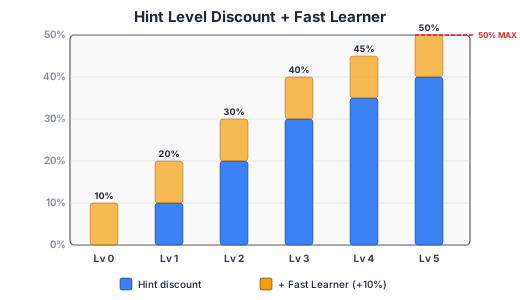
Hint levels reduce the cost of a skill. The discount percentages are:
| Hint Level | Discount |
|---|---|
| 0 | 0% |
| 1 | 10% |
| 2 | 20% |
| 3 | 30% |
| 4 | 35% |
| 5 | 40% |
Note that hint levels 1--3 increase by 10% each, then the curve flattens: level 4 is only +5% over level 3, and level 5 is another +5%.
Fast Learner
The Fast Learner toggle adds a flat 10% discount that stacks additively with the hint discount.
Final Cost Formula
totalDiscount = hintDiscount + fastLearnerDiscount
finalCost     = floor(baseCost * max(0, 1 - totalDiscount))
The max(0, ...) ensures the multiplier never goes negative (though in practice the maximum combined discount is 50%: hint level 5 at 40% plus Fast Learner at 10%).
Hint Changes and Optimization
Increasing a hint level lowers skill costs. In rating mode, with the same candidates, requirements, budget and aptitudes, the best rating should stay the same or increase. Decreasing a hint level can lower the result because fewer skills fit the budget. Required lower skills stay grouped with their gold, circle or evolution upgrades: purchase costs and replacement scores are counted once. Equal-rating builds prefer lower skill-point spend.
The Rating Score display always shows rating. Aptitude Test and Team Trials modes optimize their own objectives, so their chosen build can have a lower rating while improving the mode's objective. Compare the relevant score for the selected mode.
Manual Cost Entries
If a user manually types a cost value into the cost field (rather than letting it auto-populate from the skill database), the manually entered value is used as-is. Manual costs bypass discounting entirely -- the optimizer uses whatever number is in the cost field.
Discount Examples
| Base Cost | Hint Level | Fast Learner | Discount | Final Cost |
|---|---|---|---|---|
| 200 | 0 | No | 0% | 200 |
| 200 | 3 | No | 30% | 140 |
| 200 | 5 | No | 40% | 120 |
| 200 | 3 | Yes | 40% | 120 |
| 200 | 5 | Yes | 50% | 100 |
| 170 | 4 | Yes | 45% | floor(170 * 0.55) = 93 |
6. Skill Dependencies
Skills are not always independent. Three types of dependencies exist, and the optimizer handles each differently.
Gold + Lower Linking
A gold (rare) skill typically requires a lower-rarity prerequisite skill. In the optimizer UI, adding a gold skill auto-creates a linked lower skill row below it.
The optimizer creates a three-option decision group:
| Option | Cost | Score | Description |
|---|---|---|---|
| 1 | 0 | 0 | Skip both skills entirely. |
| 2 | Lower cost | Lower score | Take the lower skill only. |
| 3 | Gold cost alone | Gold score only | Take the gold combo. The gold's listed cost already includes the lower skill cost, so no additional cost is charged for the lower. |
In the results, the lower skill shows as "included with [gold skill]" at 0 additional cost and 0 additional score.
Circle Skill Linking
Single-circle skills can be upgraded to double-circle versions. Adding a single-circle skill auto-creates a linked double-circle upgrade row.
The optimizer creates a three-option decision group:
| Option | Cost | Score | Description |
|---|---|---|---|
| 1 | 0 | 0 | Skip both. |
| 2 | Single-circle cost | Single-circle score | Take the base version only. |
| 3 | Single-circle + double-circle (additive) | Double-circle score only | Take the combo. Both costs are paid, but only the upgrade's score counts. |
The key difference from gold linking: circle combo cost is additive (base + upgrade), while gold combo cost uses only the gold cost (which already subsumes the lower).
Parent Dependencies
Some skills have a parent skill that must be taken first. If a child skill is selected by the optimizer, its parent is automatically included in the result. The optimizer builds dependency chains during the buildGroups phase, presenting choices of:
- Skip both
- Take parent only
- Take parent + child (combined cost, child's score counts)
7. Optimization Engine
Modes
The optimizer supports three modes, selectable via the mode dropdown:
Rating Mode (Default)
Maximizes the total skill score (sum of all selected skills' rating scores) within the budget constraint.
objective = maximize(sum of ratingScore)Aptitude Test Mode
Maximizes aptitude points first, then uses rating score as a tiebreaker among options with equal aptitude points.
Aptitude point values:
- Gold/rare skill: 1,200 points
- Normal skill: 400 points
- Lower skill in a gold combo: 0 points (does not count)
The combined score used for optimization:
score = aptitudeScore * 100,000 + ratingScoreThe large multiplier (100,000) ensures aptitude points always dominate, with rating acting purely as a tiebreaker.
Team Trials Mode
A separate optimization system with its own scoring. See Team Trials for details.
Grouped Knapsack Algorithm
The core optimizer uses dynamic programming to solve a bounded 0/1 knapsack problem with mutually exclusive groups (also known as the group knapsack or multiple-choice knapsack problem).
Step-by-Step Process
- Collect valid skill rows: Scan the optimizer table for rows with a recognized skill name and a numeric cost. Build an
itemsarray androwsMetaarray. - Expand required skills: If any skills are marked as required (locked), ensure their dependencies (parents, lower skills) are also included.
- Build decision groups (
buildGroups): Organize items into groups based on their relationships:- Gold/lower combos: 3 options (skip, lower only, gold combo)
- Circle combos: 3 options (skip, base only, upgrade combo)
- Parent/child chains: 3 options (skip, parent only, parent + child)
- Standalone skills: 2 options (skip or take)
Each item is used in exactly one group. A
usedarray prevents any item from appearing in multiple groups. - Filter for required skills: If any items in a group are required, remove group options that do not include those required items. If this leaves any group with zero valid options, the optimization is infeasible.
- Run DP: For each group
g(1 to G) and each budget levelb(0 to B):- If the group has a "none" option, inherit the previous group's value (
dpPrev[b]). - For each non-none option
kin the group, check if its cost fits within budgetb. If so, computecandidate = dpPrev[b - cost] + scoreand keep the best. - Record the chosen option in
choice[g][b]for backtracking.
- If the group has a "none" option, inherit the previous group's value (
- Backtrack: Starting from
choice[G][B], walk backwards through the groups to reconstruct which option was chosen for each group. - Add remaining required items: If any required items were not picked up during backtracking, add them to the result with their original cost and score.
- Error handling: If required skills exceed the budget, the optimizer returns an error (
required_unreachable).
Memory Optimization
The DP uses a rolling two-array approach: only dpPrev and dpCurr are maintained (rather than a full G x B matrix). The full choice matrix is still needed for backtracking, but the dp values themselves use O(2 x B) instead of O(G x B) space.
dpPrev = [0, 0, 0, ..., 0]       // B+1 elements, initialized to 0
dpCurr = [NEG, NEG, ..., NEG]    // B+1 elements, initialized to -1e15

for each group g:
    for each budget b:
        try each option, update dpCurr[b]
    swap dpPrev and dpCurr
    reset dpCurr to NEG
After the loop completes, dpPrev[B] contains the maximum achievable score within the full budget.
Auto Build (Ideal Build)
The Auto Build feature filters skills before running the same optimization engine, then highlights matching rows in the results.
Filtering Rules
Skills are filtered based on the selected auto-build targets (checkboxes for each aptitude type plus "General"):
- Skills with a
checkType: Included only if:- That
checkTypeis selected as a target, AND - The character's aptitude for that type is S or A (i.e., the bucket is
"good")
- That
- Skills without a
checkType: Included only if the "General" target is selected.
Linked Counterparts
When filtering, the optimizer also includes linked counterparts (gold lower skills, circle upgrade skills) so that buildGroups can form proper combo groups. Without this, linked skills would be treated as standalone items and evaluated incorrectly.
8. Rating Badges
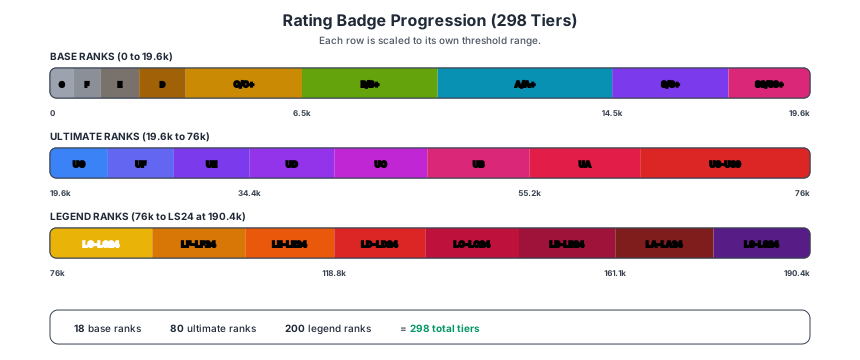
The total rating maps to one of 298 badge tiers across three rank families. Each badge has a minimum threshold -- you receive the highest badge whose minimum threshold is less than or equal to your rating.
Base Ranks (G through SS+)
| Min Rating | Badge | Min Rating | Badge | Min Rating | Badge | ||
|---|---|---|---|---|---|---|---|
| 0 | G | 2,300 | D | 10,000 | A | ||
| 300 | G+ | 2,900 | D+ | 12,100 | A+ | ||
| 600 | F | 3,500 | C | 14,500 | S | ||
| 900 | F+ | 4,900 | C+ | 15,900 | S+ | ||
| 1,300 | E | 6,500 | B | 17,500 | SS | ||
| 1,800 | E+ | 8,200 | B+ | 19,200 | SS+ |
Ultimate Ranks (UG through US9)
Each Ultimate family has a base rank plus 9 numbered sub-tiers (e.g., UG, UG1, UG2, ... UG9).
| Min Rating | Badge | Min Rating | Badge | Min Rating | Badge | ||
|---|---|---|---|---|---|---|---|
| 19,600 | UG | 28,800 | UE | 40,700 | UC | ||
| 20,000 | UG1 | 29,400 | UE1 | 41,300 | UC1 | ||
| 20,400 | UG2 | 29,900 | UE2 | 42,000 | UC2 | ||
| 20,800 | UG3 | 30,400 | UE3 | 42,700 | UC3 | ||
| 21,200 | UG4 | 31,000 | UE4 | 43,400 | UC4 | ||
| 21,600 | UG5 | 31,500 | UE5 | 44,000 | UC5 | ||
| 22,100 | UG6 | 32,100 | UE6 | 44,700 | UC6 | ||
| 22,500 | UG7 | 32,700 | UE7 | 45,400 | UC7 | ||
| 23,000 | UG8 | 33,200 | UE8 | 46,200 | UC8 | ||
| 23,400 | UG9 | 33,800 | UE9 | 46,900 | UC9 | ||
| 23,900 | UF | 34,400 | UD | 47,600 | UB | ||
| 24,300 | UF1 | 35,000 | UD1 | 48,300 | UB1 | ||
| 24,800 | UF2 | 35,600 | UD2 | 49,000 | UB2 | ||
| 25,300 | UF3 | 36,200 | UD3 | 49,800 | UB3 | ||
| 25,800 | UF4 | 36,800 | UD4 | 50,500 | UB4 | ||
| 26,300 | UF5 | 37,500 | UD5 | 51,300 | UB5 | ||
| 26,800 | UF6 | 38,100 | UD6 | 52,000 | UB6 | ||
| 27,300 | UF7 | 38,700 | UD7 | 52,800 | UB7 | ||
| 27,800 | UF8 | 39,400 | UD8 | 53,600 | UB8 | ||
| 28,300 | UF9 | 40,000 | UD9 | 54,400 | UB9 |
| Min Rating | Badge | Min Rating | Badge | |
|---|---|---|---|---|
| 55,200 | UA | 63,400 | US | |
| 55,900 | UA1 | 64,200 | US1 | |
| 56,700 | UA2 | 65,100 | US2 | |
| 57,500 | UA3 | 66,400 | US3 | |
| 58,400 | UA4 | 67,700 | US4 | |
| 59,200 | UA5 | 69,000 | US5 | |
| 60,000 | UA6 | 70,300 | US6 | |
| 60,800 | UA7 | 71,600 | US7 | |
| 61,700 | UA8 | 72,900 | US8 | |
| 62,500 | UA9 | 74,400 | US9 |
Legend Ranks (LG through LS24) -- NEW
The JP 5th Anniversary update added Legend (L) ranks above Ultimate. Each Legend family has a base rank plus 24 numbered sub-tiers (e.g., LG, LG1, LG2, ... LG24).
| Family | Base Threshold | Top Sub-Tier | Top Threshold |
|---|---|---|---|
| LG | 76,000 | LG24 | 90,900 |
| LF | 91,400 | LF24 | 104,800 |
| LE | 105,400 | LE24 | 118,200 |
| LD | 118,800 | LD24 | 132,000 |
| LC | 132,500 | LC24 | 146,100 |
| LB | 146,600 | LB24 | 160,500 |
| LA | 161,100 | LA24 | 175,300 |
| LS | 175,900 | LS24 | 190,400 |
Legend tiers increment at ~550-650 rating per sub-tier. Full threshold data is in RATING_BADGE_MINIMA in public/js/rating-shared.js.
Progress Bar
The UI displays a progress bar beneath the badge showing:
- Your current badge (rendered as a sprite from the badge sheet)
- The next badge threshold and its label
- Points remaining to reach the next tier (e.g., "+342")
- A fill percentage based on progress between the previous and next thresholds
At maximum rank (LS24 at 190,400+), the progress bar shows "Max rank reached" with a full fill.
9. Tips
- Set race aptitudes first. Aptitude grades control which score bucket is used for every skill with a checkType. Changing aptitudes can dramatically shift which skills are valuable.
- Prioritize skills whose checkType matches your strongest aptitudes (S or A). Skills evaluated in the
"good"bucket generally have much higher scores than the same skills evaluated in"average"or"bad". - Keep costs accurate and set hint levels for proper discounting. The optimizer can only make good decisions if cost data reflects what you will actually pay in-game. Use the hint level dropdown rather than manually editing costs when possible.
- For gold skills, include their lower versions so the optimizer can evaluate combos. When you add a gold skill, the linked lower skill row is created automatically. Leave it in place so the optimizer can compare "lower only" vs. "gold combo" vs. "skip both."
- Use required locks sparingly. Locking a skill as required forces the optimizer to include it regardless of efficiency. This reduces the optimizer's flexibility to find the best overall combination within your budget.
- Use Auto Build for a baseline, then refine. Run Auto Build to see the ideal skill set for your aptitudes, lock the must-haves, add any additional skills you want considered, and re-optimize.
- Stats above 2500 are clamped and provide no additional rating benefit. There is no reason to push any individual stat above 2500 for rating purposes. Spread the points across stats instead.
- Rounding matters for stat values. Scores come from a precomputed integer lookup table built from accumulated raw rates, rounded with
Math.round(raw / 10). - Pick Rating or Aptitude Test mode based on your goal. The optimizer changes its objective accordingly -- Rating mode purely maximizes skill score, while Aptitude Test mode prioritizes earning aptitude points.
10. Source Files
| File | Responsibility |
|---|---|
public/js/rating-shared.js | Stat scoring (calcStatScore), unique bonus (calcUniqueBonus), badge thresholds (RATING_BADGES), skill evaluation (evaluateSkillScore), aptitude bucket mapping (getBucketForGrade), rank sprite rendering. |
public/js/optimizer.js | Skill row management, cost discounting (calculateDiscountedCost), dependency groups (buildGroups), knapsack DP (optimizeGrouped), Auto Build filtering, aptitude test scoring (getAptitudeTestScore). |
public/js/calculator.js | Standalone rating calculator page using the shared rating engine. |
public/js/skill-popup.js | Unit-aware skill detail dialog with support card and character sources. Raw recovery values such as 550 are presented as 5.5% of maximum stamina. |
public/assets/uma_skills.csv | Skill database with names, score buckets, affinity roles, and check types. |
public/assets/skills_all.json | Detailed skill metadata including base costs, parent/lower/circle relationships, skill IDs, and categories. |